Don't let AI design "blind"
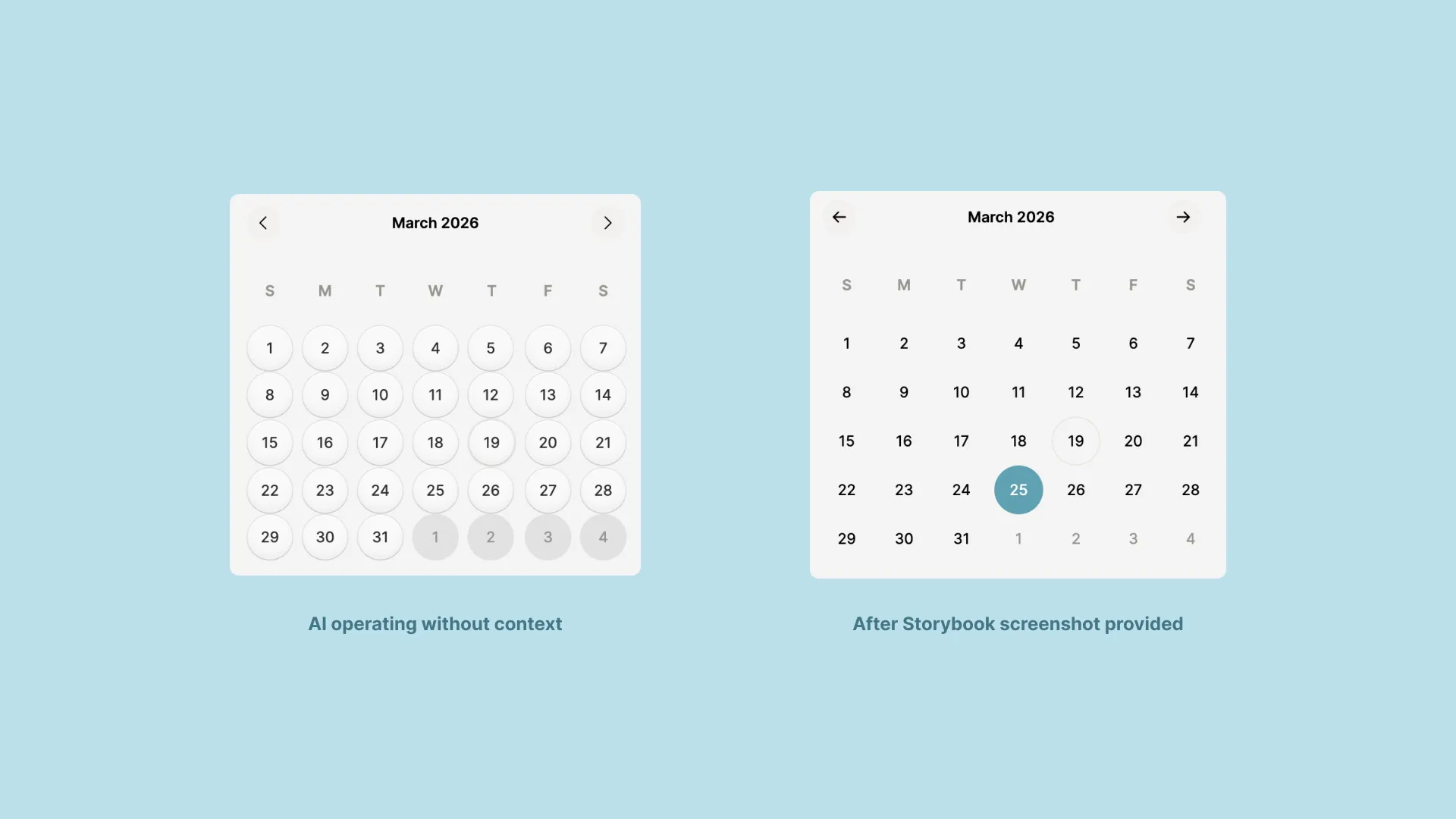
Desiging a new calendar component reminds me of the old times ...
I’ve been doing this blend of design thinking and software engineering for a long time. Long enough that some people who know me are probably surprised I haven’t said more about AI’s role in design. I’ll save that for another day.
For now, I want to talk about something I hadn’t thought about in years until AI brought it flooding back.
Designing blind
I’m old, well technically I’m middle-aged, but by web standards I should be in a rocking chair. I’m slice images into HTML tables, make some hotspots and FTP it into a server old. I remember building websites before Hot Module Replacement, before Browser Sync, before we had the tooling that continuously refreshed the browser as you worked.
Back then, spinning up a local server was expensive. I’m not talking financially, but computationally. Restarts took minutes and every change required one. The way we worked around it was to make a handful of design decisions, batch them together, restart, and pray that what we wrote worked so we didn’t have to repeat the cycle.
It’s similar to how backend and systems engineers work today. Implementing a big API change? Write the code, get to a reasonable stopping point, then test the whole thing. You had to hold a picture of the output in your head because you couldn’t see it yet. And sometimes that picture was far more optimistic than it should’ve been.
I’d completely forgotten what that felt like until it showed up again while working with AI on UI changes.
Confidently wrong
I’ve been building v2 of the UI components for CoupleFi. At some point during that work, it ran straight into the kind of problem that happens when you’re designing without being able to see what you’re doing.
I asked the AI (Claude Sonnet 4.6) to make changes to a calendar component so that it would match the Figma design. I also gave it all the context it could use, the calendar component is built on top of React Aria, which has an MCP server and prebuilt skills. I also did mockups of the new components in Figma which has an MCP server.
The design of the calendar doesn't match the Figma mockup. Do you need access
to Storybook to see it?

Yes, please — a screenshot would help a lot. But I've also spotted a clear
issue from the token values:

• --size-rhythm-100 = 0.5rem (8px) and --size-touch-target-default = 2.75rem
  (44px)
• CalendarGrid renders as a <table>, so CSS gap doesn't work — but my CSS sets
  border-spacing: 0, which eliminates all column spacing
• To get gaps in a table, you need border-spacing on the <table> element
  itself, plus a negative margin to cancel the outer-edge padding

Let me fix that now while you grab a screenshot:
Let’s be clear, it didn’t have a clue what was going on. It was guessing, coherently and confidently, but guessing nonetheless.
It wasn’t until I gave it a screenshot, an objective view of reality, that things clicked. Some work that was outside of the current session’s scope, had made the buttons inside the calendar render with rounded corners. Without being able to see the output of its changes, it had no way to connect cause and effect. The fix was obvious the moment it could see the result.
Feedback matters
Here’s what I keep coming back to: AI needs feedback to do its best work. Not just instructions. Not just context or MCP servers. Actual, concrete signal about what’s happening in the real world.
When you give an AI a task and let it run without checkpoints, you’re asking it to design blind. It’ll make reasonable decisions. It’ll explain those decisions confidently. And it might be completely off, not because it’s broken, but because it doesn’t have a clear view of what it’s producing and how well that matches your expectations.
The fix is the same one we figured out decades ago with development tooling: shorten the feedback loop. Automate what you can but don’t be afraid to manually give it a screenshot, show it the browser output, or paste in the error. Do whatever you can to give a sense of the real world.
I’ve found that working this way, with tighter loops and more concrete feedback, produces dramatically better results than handing off a big chunk of work and hoping for the best. AI can produce great work, but without having clear insight into the output of its changes, it’s sometimes impossible to create the right outcome.
For my own ego’s sake, let’s pretend that’s just about AI…